The Rise of the Personal To-Do List
Learn how to choose a personal to-do list that keeps everyday tasks visible, makes reminders easier to retrieve and avoids unnecessary upkeep.
When you remember the library book only after leaving home, the problem is not that you need a grand productivity system; it is that the reminder had nowhere useful to wait. A personal to-do list can hold that thought until you are ready to act, but its form and upkeep shape whether you notice it again.
How has the personal to-do list changed?
People have used notes to remember errands and duties for a long time. The familiar personal list now appears in many forms: a scrap of paper, a diary page, a note on a phone or a task in an app. The practical change is less about doing more than about choosing where a reminder lives and how you retrieve it.
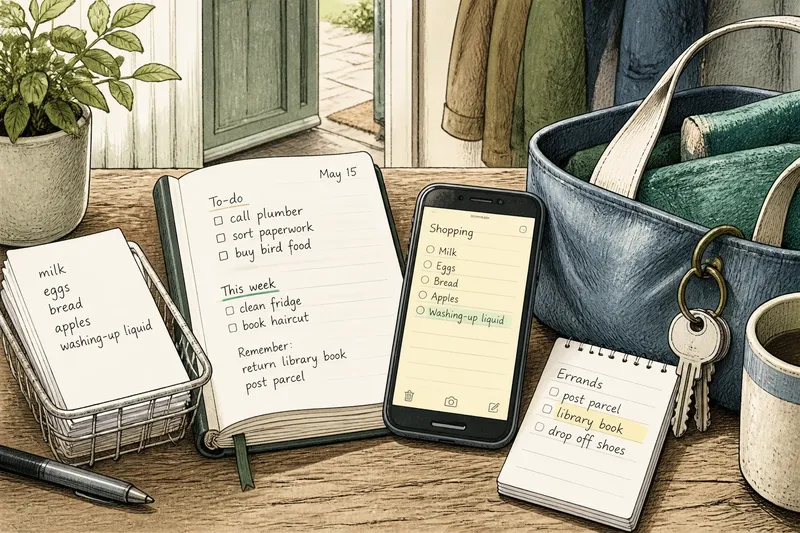
A note on the kitchen counter is quick to write and hard to overlook at home. A notebook can hold a continuing record, while a phone note can travel with you and be edited when plans shift. These formats do not create extra time; they offer different ways to keep a thought from depending on memory alone.
A list is a little like a bowl by the door: it gives a passing item a place, but it does not decide when you leave the house. Its value lies in making the item findable at the moment it matters.
Which format helps you retrieve tasks?
Loose paper for a single outing
A small pad or scrap suits a short shopping list or a few errands tied to one trip. Give it a predictable home, such as beside your reusable bags. If the note gets left behind or fills with old items, clear it after the outing or move the still-needed task to a more reliable place.
A notebook for a visible record
A diary or notebook works well when you like handwriting and want tasks beside appointments or other notes. Keep the current page easy to find, and carry forward only items that still matter. If old pages make unfinished tasks hard to spot, mark the active page clearly rather than copying the entire backlog.
A phone note or task app for changing plans
A notes app or task manager is useful if you already carry your phone and want to add, move or search items while away from home. Separate lists can help distinguish groceries from household jobs; a reminder can bring a specific task back to your attention.
The trade-off is distraction. If opening the phone leads you into messages or other alerts, a paper note may be easier to consult. Extra features help only when they solve a real retrieval problem.
How can you choose a personal to-do list?
Begin with the place where you most often need to retrieve a reminder. If ideas come while your hands are busy, choose a quick capture point you can reach safely. If you forget tasks that are out of sight, use an open notebook or a note in a familiar spot. If you need the same list in several places, a phone may be more convenient.
Match the format to the list’s purpose, too. A shopping note can be brief and disposable. Irregular household jobs may need headings in a notebook or app. Put appointments in a calendar so their dates and times are easy to see; keep preparation or follow-up tasks on your list.
Say you often remember washing-up liquid only once you are in the supermarket, while the shopping note stays on the kitchen counter. Imagine moving that running list to a phone note you can open from the home screen. The steps are to create the note, add the items as they occur to you, and check it before entering the shop; the expected result is that the list is available where the purchase happens. If the phone distracts you or remains in your bag, put a small pad with your reusable bags instead and check that before leaving home.
What questions help you settle on a list?
Should appointments go on a to-do list?
You can mention an appointment, but a calendar is usually clearer for anything tied to a time or date. Keep related actions, such as preparing a document, on the to-do list.
Is paper better than a to-do list app?
Neither suits everyone: paper is direct and visible, while an app is portable and easy to edit. Choose based on where you need to retrieve tasks and whether phone alerts help or distract you.
What should you do with unfinished tasks?
Decide whether each item still matters before carrying it forward. Remove tasks that are no longer relevant; move useful ones to a place where you will see them again.
How many separate lists do you need?
Keep enough separation to make items easy to find, but avoid creating more homes than you can remember. If you keep checking several places, combine related tasks or choose one main list.
How can you tell when a list is getting in the way?
Look at what happens when you consult it. If you repeatedly copy the same item, overlook a long backlog or check several apps to find one reminder, simplify the system. Remove stale tasks, combine lists that serve the same purpose and keep only the details that help you recognise the next action.
- If a paper note is missing when you need it, move it to a fixed place or use a format you carry; if it is easy to find, keep it there.
- If a notebook’s active page is buried among old entries, mark the current page or use a fresh section; if you can see current tasks readily, leave the layout alone.
- If a phone alert pulls you into unrelated apps, turn off non-essential notifications or switch that reminder to paper; if the alert returns your attention usefully, keep it.
- If appointments are getting lost among ordinary tasks, put their dates and times in a calendar; if they are already clear there, keep only preparation actions on the list.
- If you rewrite an item without deciding whether it still matters, remove it or give it a clear next action; if it remains relevant and actionable, carry it forward.
- If several lists hold the same kind of task, combine them or give each a distinct purpose; if you can explain why each list exists, retain the separation.
The rise of the personal to-do list is really a story of changing places to store everyday reminders, from loose paper to searchable notes. The best personal to-do list is the one you can find when the relevant moment arrives, without creating more maintenance than the reminder deserves.
Before settling on a format, try it with one recurring task and notice where you naturally look for it. If the reminder is visible at the right moment, keep the arrangement; if not, change its location before adding more lists or features.